
No more paper forms, spreadsheets, or phone tag: one platform.
See the Marina Software That Runs Your Whole Day
Follow one boat from an after-hours call to a paid invoice in under a minute. Then book a walkthrough built around how your marina works.
Chaos to Calm · 0:52 · No sound needed
Sample data shown; names, boats, and amounts are fictional. Read the film as text
Book a walkthrough
Request Your Demo
Tell us a little about your marina. We’ll set up a walkthrough around the way you work.
- No commitment
- No credit card required
Next, we’ll reach out to schedule a time that works for you.
Inside the film
From a 9:52 PM Call to Paid by 4:40 PM
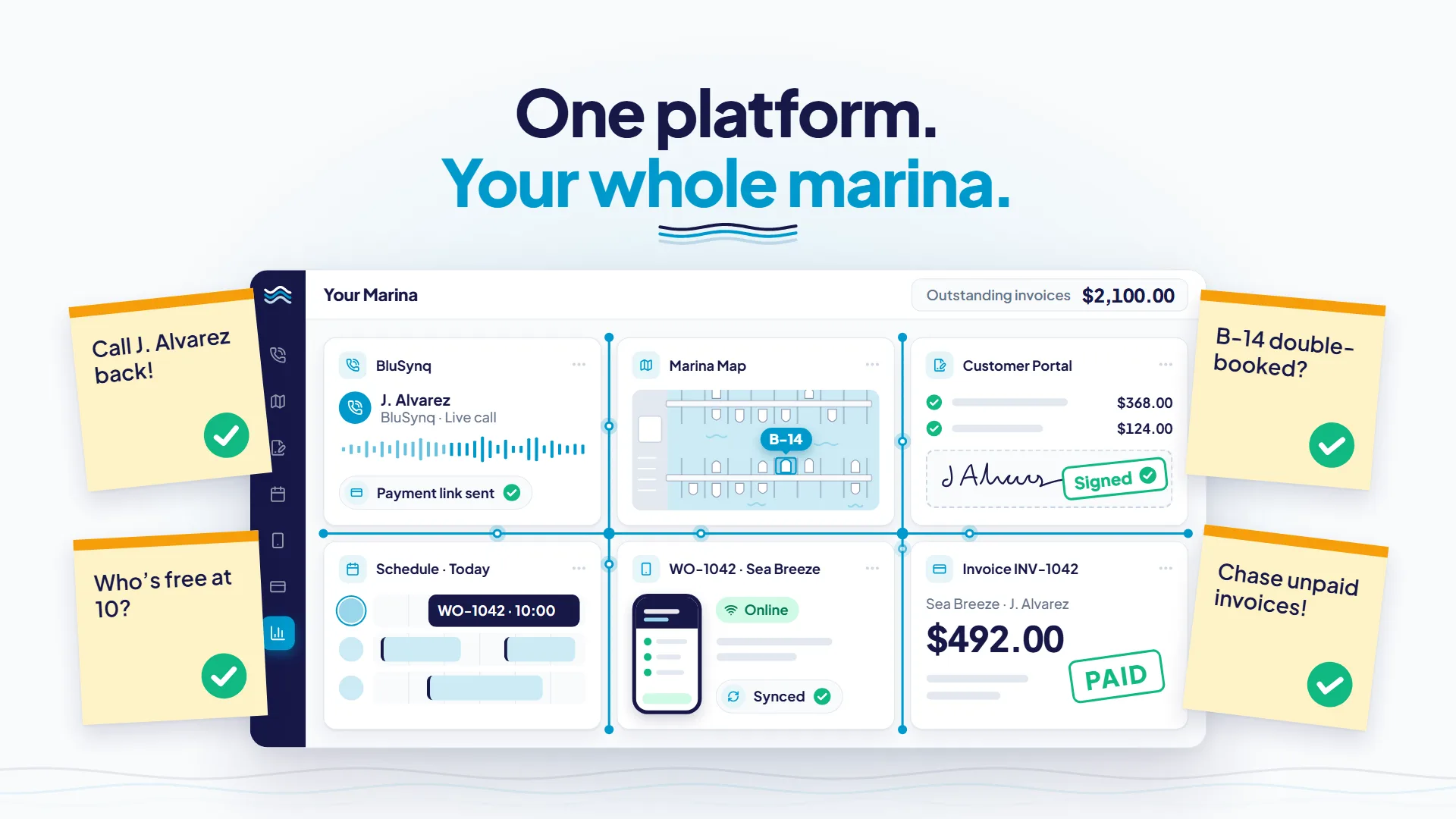
The film follows Sea Breeze, a fictional 34-foot boat, through one connected marina day. Here’s what happens in each chapter and where it lives in BluMarina. Pick one to watch it again.
It starts with four sticky notes. By 4:40 PM, every one is checked off.
- Call J. Alvarez back! (to do)
- B-14 double-booked? (to do)
- Who’s free at 10? (to do)
- Chase unpaid invoices! (to do)
- 9:52 PM
BluSynq AI Voice Agent
After-Hours Calls, Answered
At 9:52 PM the office is closed, but BluSynq answers. During the call it finds the customer and vessel, checks slip availability, books the slip, starts a service estimate, and texts a payment link. Your team gets a full transcript and summary afterward.
- 7:30 AM
Docks & Slips
Your Whole Dock on One Map
Every slip sits on a map drawn over satellite imagery, color-coded by status and recolored for arrivals, departures, or availability on any dates. Assign a boat and BluMarina flags a double-booking or a vessel too big for the slip before anything is saved.
- 9:15 AM
Customer Portal · eSignature
Estimates Approved and Signed From a Phone
The boat owner opens the estimate from a secure link in their phone’s browser, approves the whole job or line by line, and signs. No app to download and no login needed to sign. The approved estimate becomes a work order automatically.
- 9:20 AM
AI Scheduling
The Right Tech at the Right Time
The AI scheduling assistant suggests a technician and time slot for the new work order, weighing vessel location, skills and certifications, availability, and workload. You accept or reject each suggestion, and the drag-and-drop schedule flags conflicts as you move jobs.
- 10:05 AM
Mobile Technician App
A Technician App That Works Offline
At slip B-14 there’s no signal. The technician still clocks in with geofence verification, scans the part out by barcode, and captures before-and-after photos. Everything queues on the device and syncs automatically on reconnect.
- 4:40 PM
Payments · Powered by ValPay
Text a Payment Link. Get Paid.
The boat is ready, so the invoice goes out as a payment link by text. The customer pays by card, ACH, or digital wallet through ValPay’s PCI-DSS Level 1 certified checkout, and the payment syncs to QuickBooks Online automatically.
What Happens After You Request a Demo
Here's exactly what to expect, from the form to the walkthrough.
- 1
Tell Us About Your Operation
Fill in the short form. Use “What can we help you with?” to tell us what you run and what you’d fix first, whether that’s slips, service, payments, or after-hours calls.
- 2
We Reach Out to Schedule
A member of the BluMarina team contacts you to find a time that works.
- 3
See BluMarina Set Up for Your Marina Type
Your walkthrough focuses on your kind of operation, whether that’s a full-service marina, boatyard, yacht club, or marine dealership, and spends the time on the workflows you care about.
- Step 4
Get Straight Answers
Ask anything about moving from your current system, migrating your data, and onboarding your team.
Helpful to Have Handy
- Roughly how many slips, boats, or service jobs you manage
- The software, spreadsheets, or paper forms you use today
- The one workflow you’d fix first if you could
Invite whoever runs your front desk or service department. They’ll have great questions.
No commitment, no credit card required.
Click Through BluMarina Yourself
Take the self-serve walkthrough at your own pace. There's no form and no sales call. Use the chapter menu inside the walkthrough to jump to the parts you care about.
Want to see it set up for your type of operation?
Request a DemoThe specifics
The Specifics Your Team Will Ask About
Straight facts on payments, accounting, field work, and setup.
PCI-DSS Level 1 Payments
Payments run on ValPay, embedded in BluMarina. Merchant onboarding happens inside the platform, with no separate processor relationship to manage.
QuickBooks Online Sync
Payments and refunds sync automatically, with a transaction log that matches each payment to its invoice.
eSignature Built In
Reusable templates, bulk sending, expirations, and audit trails, with no separate DocuSign-style subscription.
Offline-First Technician App
Installs from the browser, keeps working without signal, and runs in English, Spanish, French, and Russian.
24/7 AI Voice Agent
BluSynq answers calls around the clock and hands the caller to your staff when they ask for a person.
Cloud-Native
No installs and no on-premise servers. Your staff work in the browser, and your boaters use a branded web portal.
Add what you need: Docks & Slips, Dockage Reservations, Boat Rentals, Boat Club, Dry Stack are opt-in modules that share the same customers, vessels, payments, and reporting.
Built for
- Full-service marinas
- Boatyards and repair facilities
- Yacht clubs
- Marine dealerships
Demo Questions, Answered
Run Your Marina. Not Your Paperwork.
Tell us how your marina runs today. We’ll walk you through the same connected day, built around your operation.
No commitment.
No credit card.